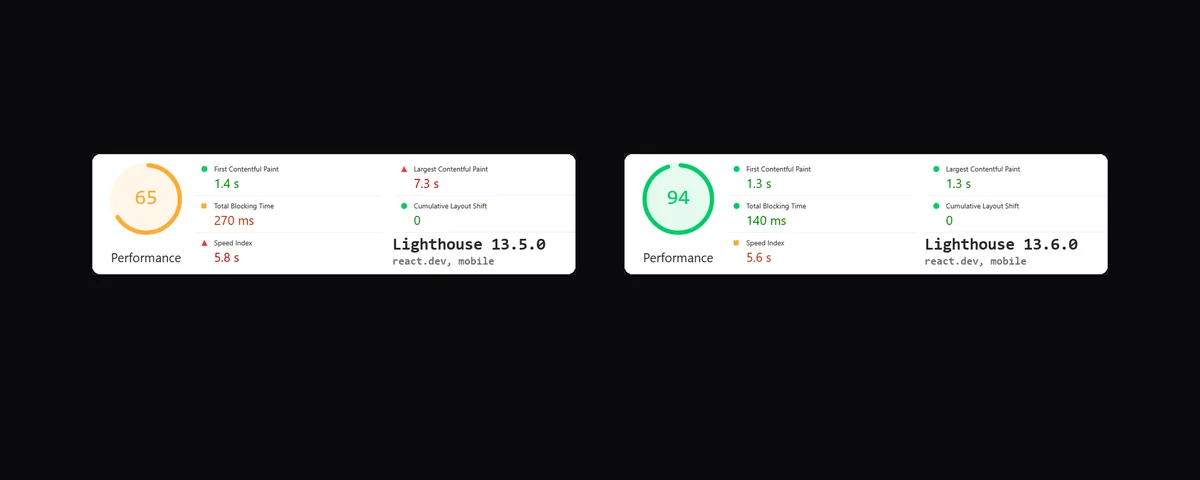
Since October 27, 2026, PageSpeed Insights has been running on Lighthouse 13.6.0, whose Lantern simulation was reworked to estimate FCP and LCP. Lab scores usually come out higher, especially on JavaScript-heavy sites. A score that climbs this week proves nothing about the site itself: check that both reports compared cite the same Lighthouse version, and look at CrUX field data, not just the lab score.
Contents
PageSpeed Insights now runs Lighthouse 13.6.0, a version released on October 27, 2026 with a reworked Lantern, the simulation that estimates First Contentful Paint (FCP) and Largest Contentful Paint (LCP).12 Barry Pollard, from Chrome's web performance team, said on Bluesky that these simulated measurements are becoming more accurate and generally produce higher scores, especially on sites heavily dependent on JavaScript.1 This article covers what changed in the simulation and how to read a speed report without mistaking a site improvement for an effect of the tooling change.
01How a score can climb without any site change
The performance score shown by PageSpeed Insights comes from a Lighthouse simulation, not from a measurement on a real visitor's device.3 Changing that simulation can move the score of a page that received no change at all.1
Lighthouse 13.6.0, released October 27
Release notes in the GoogleChrome/lighthouse repository date version 13.6.0 to October 27, 2026, and state the team expects it to ship in the DevTools of Chrome 159, then in PageSpeed Insights within a week.2 Search Engine Journal reports that PageSpeed Insights has indeed switched to this version.1
JavaScript-heavy sites, the most affected
Pollard commented on a developer's report of a sizable improvement in single-page application results since the update, citing react.dev as an example.1 He added that the effect is not specific to single-page applications but more broadly affects sites heavily dependent on JavaScript.1
02What Lantern simulates differently since 13.6
The release notes list several changes to Lantern, the simulation that estimates loading speed without actually measuring it.2 Two of them touch directly on how FCP and LCP are calculated, a third concerns a separate audit aimed at AI crawlers.
Network and connections
Lantern now treats HTTP/3 connections as multiplexed, credits consumed H2 overflow bytes across simulation steps, excludes connectionless requests from active connection counts, and improves origin round-trip time and throughput estimation.2
Text LCP now calculated from the same requests as FCP
When the LCP element is text that appears in the same frame as the page's first content, Lantern now estimates that LCP from the same requests and tasks used for FCP, instead of from a set that could include every request made before LCP.2 Ivan Akulov showed, in a GitHub issue, how the old simulation handled a test page built with Framer whose only above-the-fold content was text: that same element counted as both FCP and LCP, yet Lighthouse reported a simulated LCP much later than FCP.1 Preloading the page's JavaScript modules improved that page's real interactive time, but made the simulated LCP worse.1 Pollard thanked Akulov for kicking off some of these improvements, and the Lighthouse team closed the issue as completed in the Lantern upgrade listed in the 13.6 release notes.1
A GEO-side change: the ARD audit now looks for ard.json
Lighthouse 13.6 also updates the Agentic Resource Discovery (ARD) audit to specification version 0.91: it looks for an Agentmap line in robots.txt, a rel="ard" link tag or header, and /.well-known/ard.json, before falling back to the old ai-catalog.json name.2 Version 13.5 still only looked for that old name, even though the specification had already moved to ard.json: a site that only used the new name without an Agentmap line in its robots.txt showed up as not applicable.1 Checking which robots.txt rules apply to AI crawlers shows whether an Agentmap line or an equivalent rule is already in place before worrying about a negative ARD audit.
03How to read a speed report without getting it wrong
The update changes nothing for the visitor actually loading the page. It only changes the lab simulation, which calls for two checks before commenting on a score.
Lab data versus field data
According to PageSpeed Insights documentation, lab data comes from a simulated load on a single device under a fixed set of network conditions, and Google notes that having good lab data does not necessarily mean real-user experiences will also be good.3 Field data, shown in the same report, represents real visits over the last 28 days, as reported by the Chrome User Experience Report (CrUX).1 The breakdown of the two blocks in a PageSpeed Insights report explains how to read them side by side without adding them together.
Check the Lighthouse version before comparing two reports
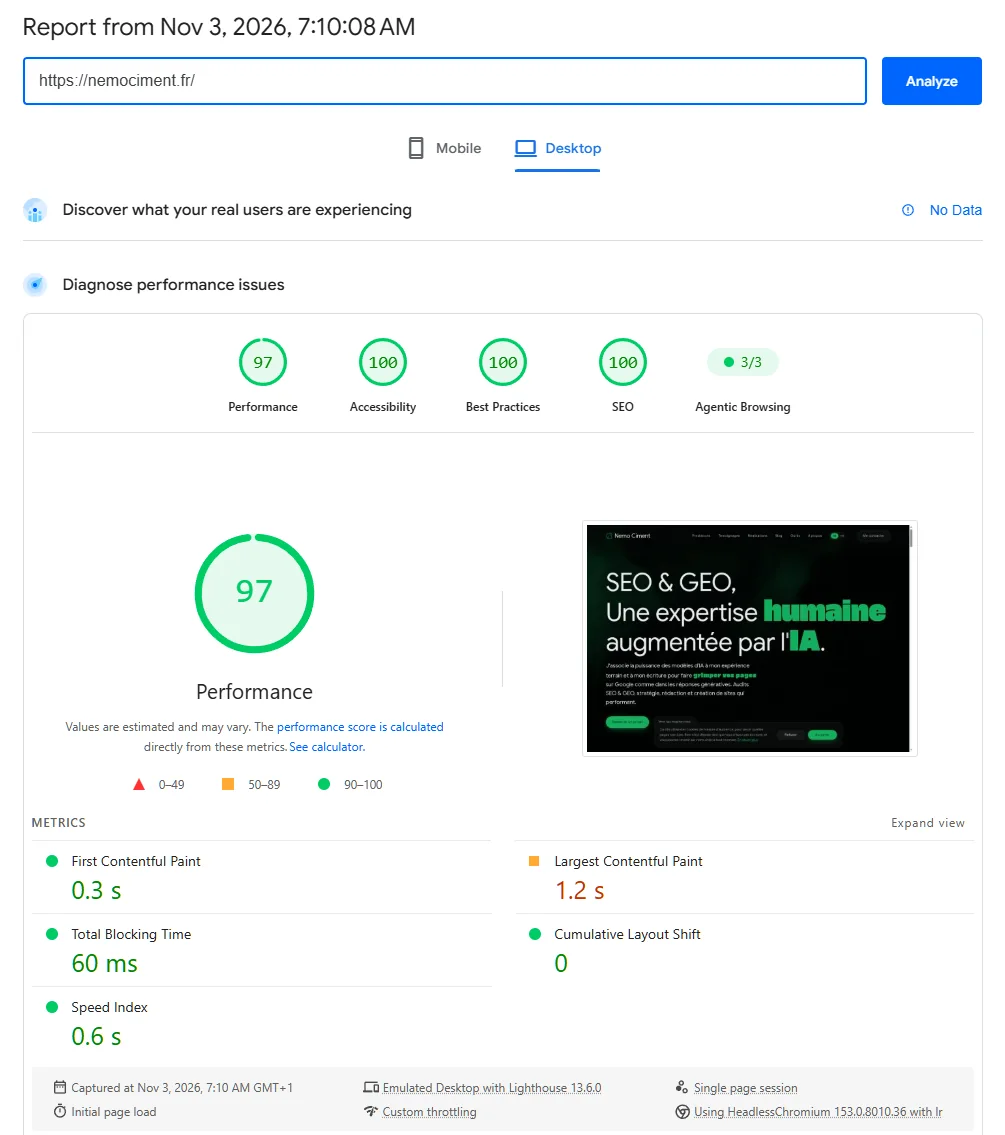
Every PageSpeed Insights report states the Lighthouse version used, next to the emulated device.1 Two reports taken before and after October 27 were not measured with the same simulation: part of a higher lab score on a page just optimized may come from the new version, and a chart tracking lab scores over time may show a jump at the switch to 13.6.1 Before reporting an improvement, check that both reports compared cite the same Lighthouse version, and look at the field data too.1
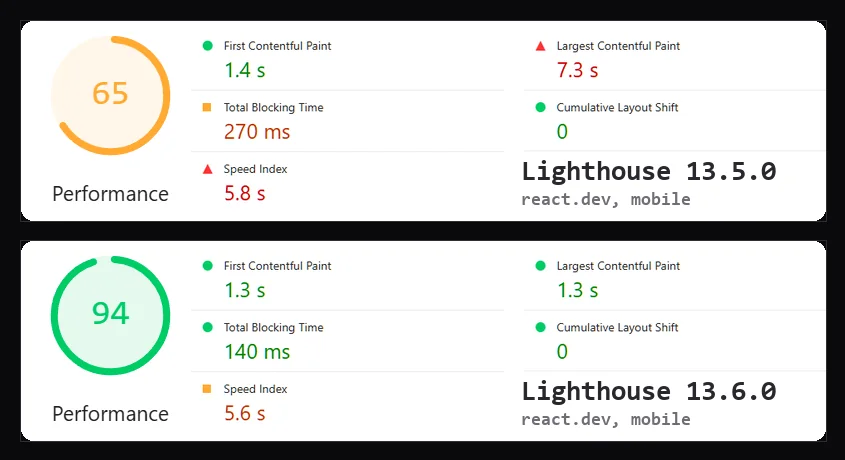
To see the effect on a real site, I ran Lighthouse 13.5.0 then 13.6.0 from the command line on react.dev, the example cited above, from the same machine, three runs per version. On mobile, the median performance score goes from 65 to 94: simulated LCP drops from 7.3 s to 1.3 s and TBT from 270 ms to 140 ms. On desktop, the score goes from 99 to 100. On nemociment.fr, a static site with little JavaScript, the direction is the opposite: the median mobile score goes from 79 to 72 and desktop stays at 96. The effect therefore depends on the page, and a score can also drop without the site having changed.
The classic client-reporting trap
For an agency tracking a client site's speed, a score that climbs the week of October 27 with no technical work on their end is the classic trap: nothing in the single number shown distinguishes the effect of the simulation change from a real improvement.1 The technical audit that also tracks Core Web Vitals relies on a site's field data, which does not move with a Lighthouse update.